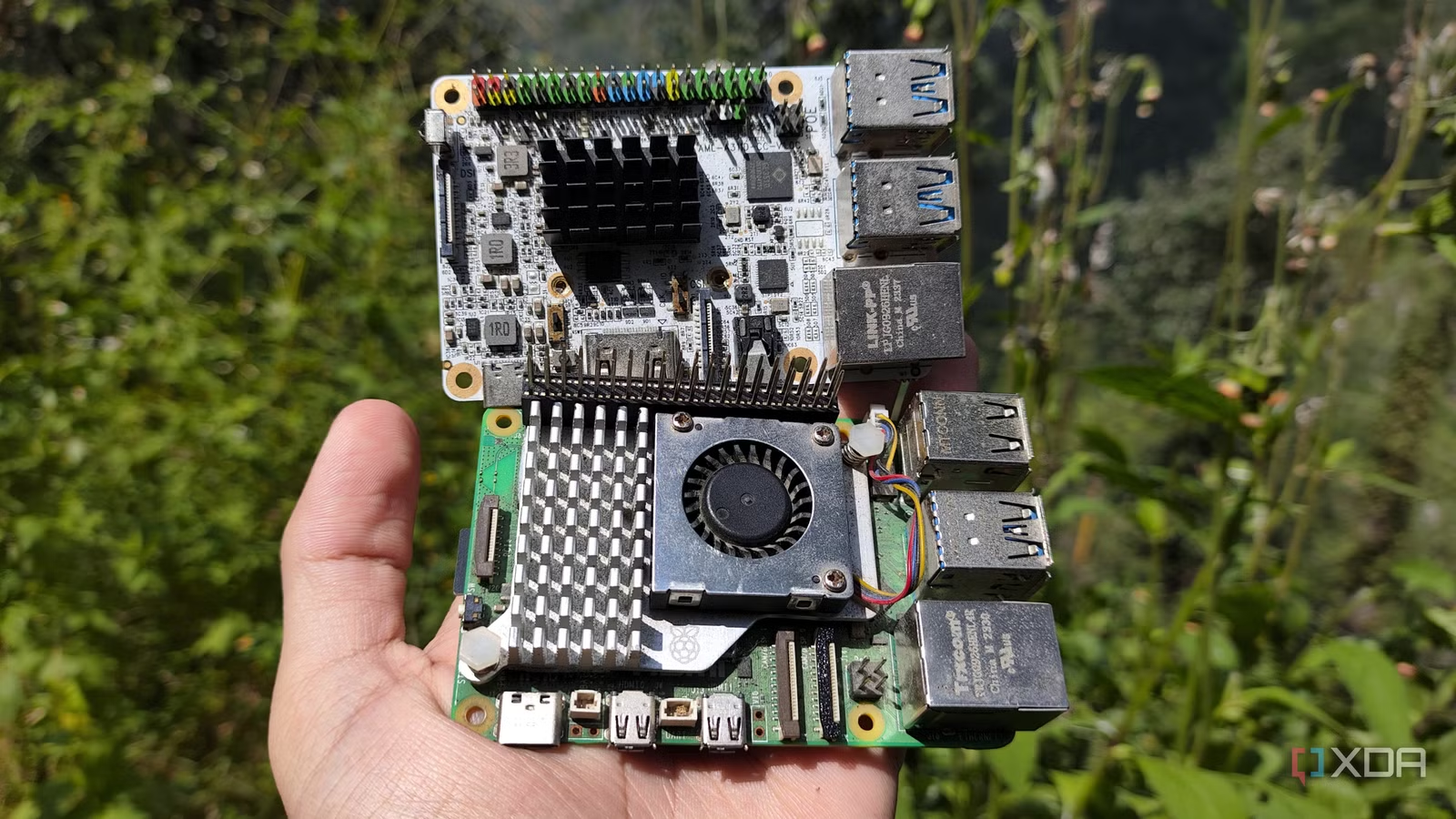
Despite being a Raspberry Pi user at one time, there are many pricing issues with modern RPi single board computers. First, even the latest and greatest Raspberry Pi 5’s specs are pretty dated, especially compared to the competing boards that have been popping up everywhere lately. As the RAM apocalypse continues, causing Raspberry Pi SBC prices to soar out of control, it’s getting harder and harder to justify getting one of these boards for simple projects.
But as the owner of several Raspberry Pi competing SBCs, I have to admit that it’s not all sunshine and rainbows on this side of the fence. Of course, if we turn to the specifications, you can find many boards with a similar price that surpass the Raspberry Pi family. But once you throw software (and hardware) compatibility into the mix, things start to get murky for the Raspberry Pi’s competitors.
OS compatibility is still an issue for ARM-based Raspberry Pi competitors
Their documentation is also weak compared to RPi boards

Before you can start working with a new SBC, you need to equip it with the right operating system, and this is not much of a problem with the Raspberry Pi series. After all, the Raspberry Pi operating system is a solid solution for the SBC family, and you get dozens of options to choose from in RPi Imager. It’s not official, but before you add all the community-made OS options that work well as long as you follow the documentation.
Speaking of documentation, Raspberry Pi has much better learning resources for beginners. The official Raspberry Pi documentation itself is a treasure trove of information when you’re just getting started, and you have an active community of workers constantly creating new projects and experiments. The same goes for troubleshooting, as the solution to most ailments plaguing your Raspberry Pi experiences can be found by searching the official forums.
However, when you move to other SBC families, especially on the ARM front, things change dramatically. Finding the right distros to work with your board can be a real challenge, so it’s easy to run into random compatibility issues with images that are otherwise “fully supported” by the manufacturer. If it’s as popular as the Orange Pi, you might have some luck on the imaging front, but when it comes to other ARM offerings from obscure manufacturers, their imaging selection will be very limited.
If that wasn’t enough, non-Raspberry Pi manufacturers usually stop storing these images within a few months of releasing the SBC. Combine that with the lack of forum work and the dearth of documentation, and you can see why I’m afraid to get ARM boards that, despite better specs and cheaper price tags than the Raspberry Pi, give me a pretty bad experience when I try to build projects with them.
Hats and cool GPIO accessories don’t go well with non-Raspberry Pi boards
It’s all trial and error with this SBC
In addition to their high compatibility with the Raspberry Pi, they also work well with standard SBC accessories. For example, cases are a dime a dozen per Raspberry Pi SBC, and if you’re into 3D printing like me, you can also find STL files for modular cases. Likewise, touch modules that require drivers run seamlessly on the Raspberry Pi, and many CSI cameras and DSI screens provide a plug-and-play experience with these popular SBCs. However, there is no guarantee that these drivers will build on a competing x86 board, let alone an ARM version.
Then you have hardware attached to top accessories that plug into the SBC’s GPIO pins and unlock additional functionality. The Raspberry Pi SBC, that is. Of course, boards with 40 GPIO pins can have the same number of physical connections as a regular Raspberry Pi, but they often have different pin layouts. So a cool SATA adapter may not work on a Raspberry Pi competitor that doesn’t have a HAT name, even if it physically aligns with the pins.
Sometimes it’s better not to stick with the SBC form factor

Despite all the advantages I’ve mentioned so far, there’s no denying that Raspberry Pis are very expensive these days. Of course, if I had to choose an SBC for heavy circuit experiments, robotics projects, or DIY smart home devices, I’d prefer a Raspberry Pi (preferably zero unit) over other ARM boards. But if I could replicate these projects on inexpensive microcontrollers, I’d switch to a cheap ESP32 in a heartbeat.
Likewise, I can technically run server-oriented tools on ARM boards like the Raspberry Pi, but that involves a bunch of performance and compatibility workarounds. That’s why I stick with x86 SBCs and mini PCs for projects that require full VM and home server platforms, especially since the updated thin clients sell for less than the flimsy Raspberry Pi boards.
Related Posts
 Microsoft’s rollback of Copilot continues with scaling it out of OneDrive’s file manager options.
 This ESP32 CYD project turns your display into a Flock camera scanner
 Hackers are using unpatched Plex servers as crypto-miners, and yours could be at risk.
 The 3-2-1 backup rule has an obvious caveat that ransomware exploits very well.